

About Mile Davchevski
Mile Davchevski is the Head of SEO at Rhino Entertainment Group and Founder of SEOMigo, with over a decade of experience driving search growth across competitive digital markets. Known for his hands-on approach and technical depth, Mile has worked across in-house, freelance, and leadership roles. Mile brings clarity, structure, and long-term performance to every SEO strategy he touches. He also lectures on SEO, GTM, and GA4, helping educate the next generation of digital marketers.
The Guide—Technical SEO Audit in 3 Steps
Tech SEO, as the fundamental aspect of any site, should be one of the first things to focus on when starting (or taking over) an SEO project. After all, it’s one of the few things we as SEOs can control nearly 100%, so why not ensure it’s as good as it can be? Here’s where my Ultimate Technical SEO Audit comes in. It will take just a few steps to complete, and it will give you a 360-degree picture of where you stand and what needs to be done to get to those “near-perfect” perfect PSI scores.
This article is a practical, no-fluff walkthrough of Mile’s go-to technical SEO audit process, built for SEOs who want clear direction and actionable output. Whether you’re starting fresh or picking up a messy project midstream, this 4-step framework gives you everything you need to uncover technical issues fast and prioritize the fixes that matter most.
Before You Start: Tools You’ll Need
Let’s start with the tools you’ll need:
- Screaming Frog
- GSC (Google Search Console)
- Google Pagespeed Insights
There are alternatives to Screaming Frog (e.g. JetOctopus) and Google Pagespeed (e.g. Pingdom/GTMetrix), but the pricing gets a little steep, so let’s keep it cost-effective. Most people doing tech audits will make do with the three tools provided above.
The time it will take to complete the audit depends on the size of the website being audited and the usage of Screaming Frog. But in general, it may take anywhere from a few hours to a few days. (Gathering the data is the easy part, the hard part is deciding what to do with it!).
1. Step 1- Perform a Screaming Frog Crawl
It goes without saying that this is the go-to tool for tech SEO audits. It’s basically a web scraper that scrapes the site and gathers different data aspects into well-defined overview buckets. The good thing is it’s fairly cheap for an SEO tool, sitting at 245 EUR per year. There is a free plan as well, but it’s quite limited in how much it can crawl. It will give you the most comprehensive overview of the website in question, in a structured, albeit a bit overwhelming for beginners, format that provides both insight and an error summary. Here’s how to set it up for a crawl and what to pay attention to in almost all cases:
1.1. User Agent
The user-agent always must be Googlebot-Smarphone. The reason why we are doing this are multiple, but the most important ones are JavaScript rendering and website firewalls. JS rendering is a huge issue in the SEO world, and since this is an SEO audit, you need to make sure the JS portions of the site are visible to the search engine. And, of course, smartphone because nowadays, big G crawls sites exclusively with mobile crawlers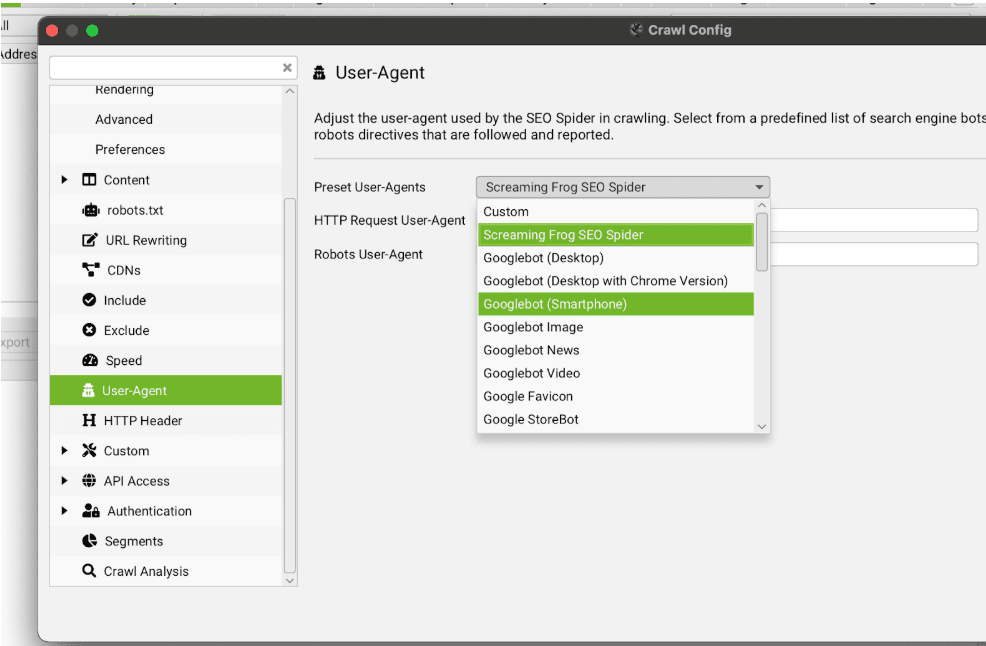
1.2. Crawl Speed
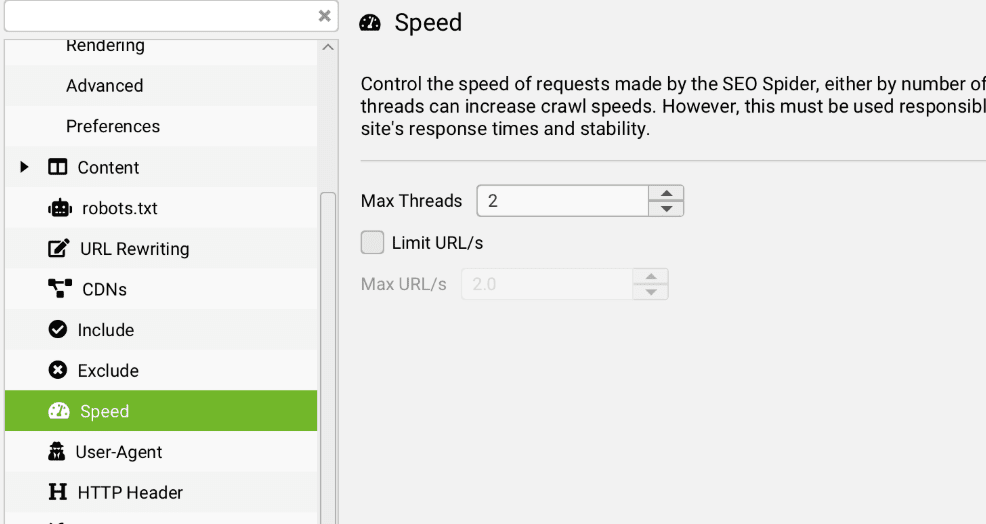
Since we do not want to overload our servers with request from the scraper, it’s always good to limit the speed at which we fetch URLs. The sweet spot is 2 Max Threads.
1.3. Spider Setup
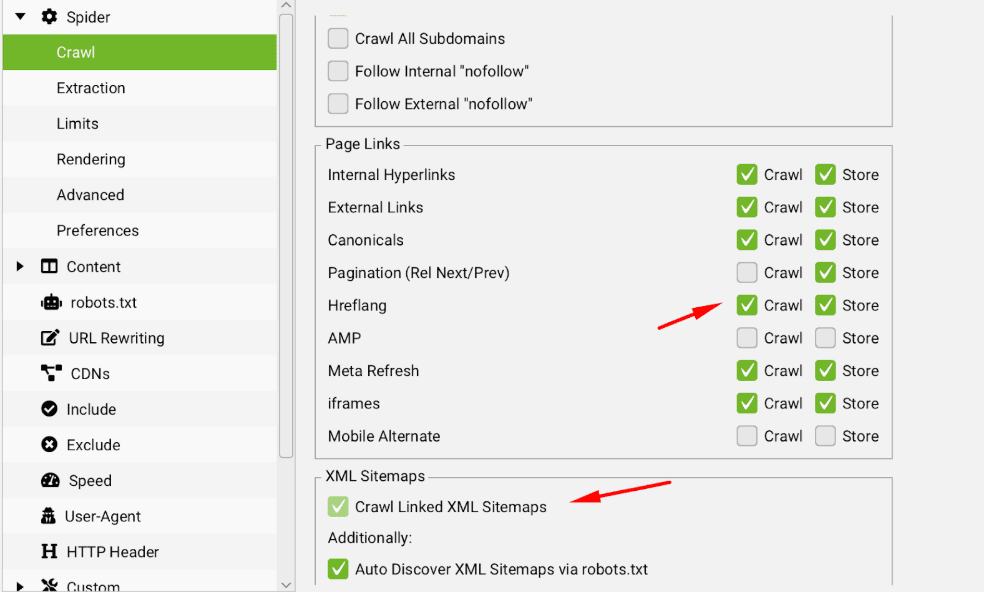
Out of the box, some vital parts are not selected, so you must tick them manually. These are the “Crawl hreflang” and Crawl Linked XML Sitemaps from Crawl and the JSON related boxes in “Etraction”
1.4. Custom Search/Extraction
Optional, you can even set up a custom search or extraction that will search for or extract dedicated parts of the HTML based on your input. Very useful for dynamic stuff, for example, year changes in flat HTML text (which we all should be doing now that the New Year’s come)
What to Pay Attention To
Now that we’ve set up Screaming Frog, let the crawl complete. After it’s done, you’ll end up with a scrape that contains a massive amount of data. You need to prioritize it somehow, so here’s a list of what takes priority.
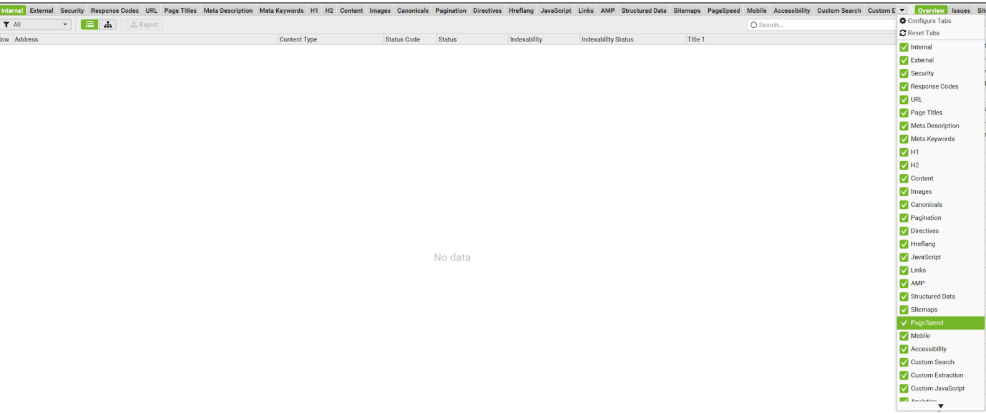
- Response Codes (301s, 404s, 5xxs)
- Canonical Errors (duplicate, missing, non-indexable)
- Hreflang Errors (any possible issues with the hreflangs, like missing return tags and non-indexable hreflang URLs)
- Meta Tag Errors (Meta Titles, Meta Descriptions)
- Heading Errors (H1s mostly, but H2s also in some cases)
- Image Errors (Besides the obvious PSI issues, alt texts and file name conventions)
- The rest of the issues (as most of the time, the above 6 account for most issues detected on site that should be prioritised)
Step 2. Review Existing GSC (Google Search Console) Data
The second go-to tool for tech SEO audits. Coming straight from Big G’s stack of marketing tools, GSC shows how Google sees your site. Here, you find both good and bad things, making it an indispensable tool in an SEO’s arsenal. Below, I will outline the most important aspects of GSC to consider when performing a tech SEO audit:
- Pages Report
- Sitemaps
- Core Web Vitals
- Security and Manual Actions
- Crawl Stats Report
Pages Report
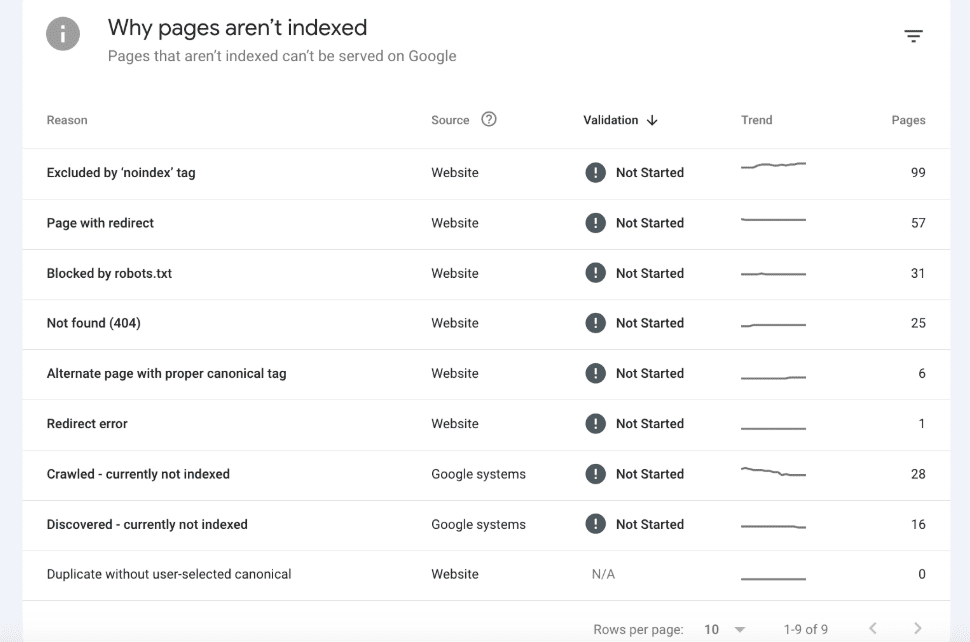
The pages report provides valuable insight into the current situation of all pages, as well as any “error” codes discovered by Google. The reason I put this error into quotations is that it’s nearly impossible to have a clear report here, as natively any website will have redirects, 404s due to bad backlinks, noindexed pages, and pages blocked in robots.txt. Therefore, the items here alone aren’t a reason to panic.
The more important thing to follow here is trends, and rapid/steep changes in both positive and negative trends. Any graph that shows such movements needs to be investigated individually (by clicking on the item in GSC) to review individual URLs that have been flagged with the potential error.
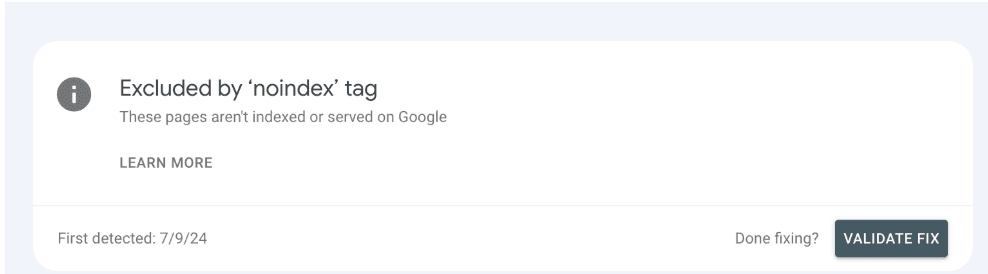
Perhaps the best thing about this is that, besides giving you insight into potential errors, it also provides a tool to verify your fixes. Therefore, after you fix the issue, you can verify the fixes by clicking on the item and then “Validate Fix”.
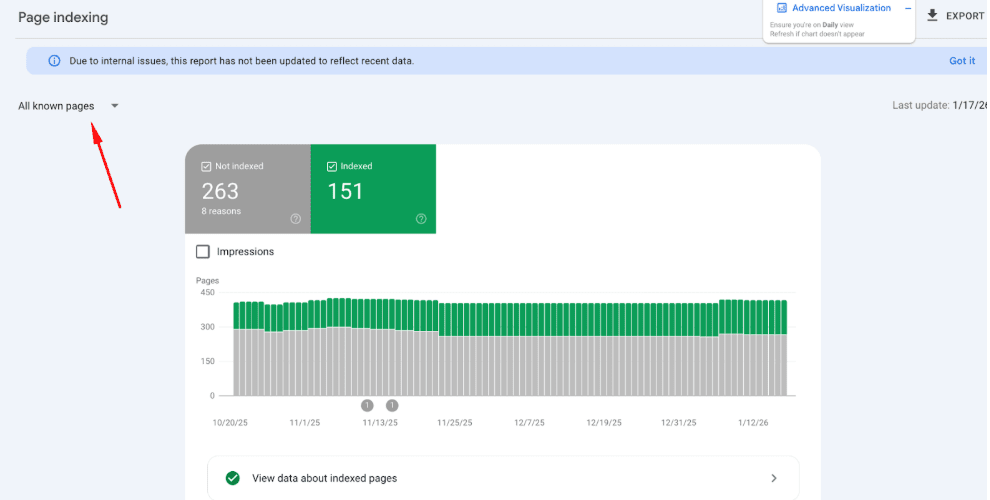
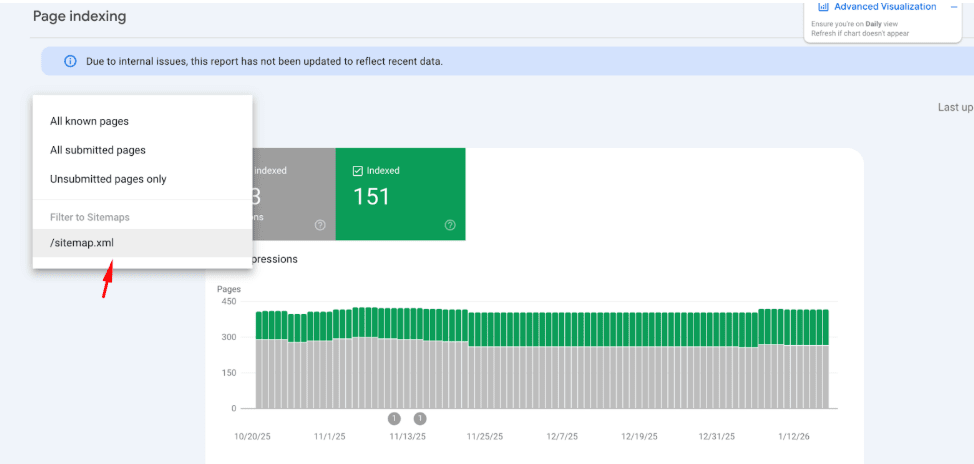
Pro tip: You can view the pages report either in bulk, or per sitemap submitted. The latter offers a great way to view how Google percieves your key pages that you’ve submitted via the sitemap without much clutter.
Core Web Vitals
The Core Web Vitals report shows PSI metrics field data from your site. Most websites fail some portion of these metrics because they’re not 100% based on the site’s actual performance. It also takes user devices, internet connections, and other factors into consideration as well. It’s just important to keep note of these metrics here and where you fail, as you cannot really affect these issues without doing proper Google Pagespeed tests and identifying areas for improvement.
Security and Manual Actions
This report is really simple, but very telling. It basically says whether the site is burnt (i.e. penalized) or not. If penalised, there are ways to attempt recovery, like rectifying underlying security issues or a domain swap, but most of the time, it’s game over for all SEO done until that point. Therefore, for a tech SEO audit, the outcome of this test is simple – the website is not on the receiving end of a Manual Action and there aren’t any issues with the security.
Crawl Stats Report
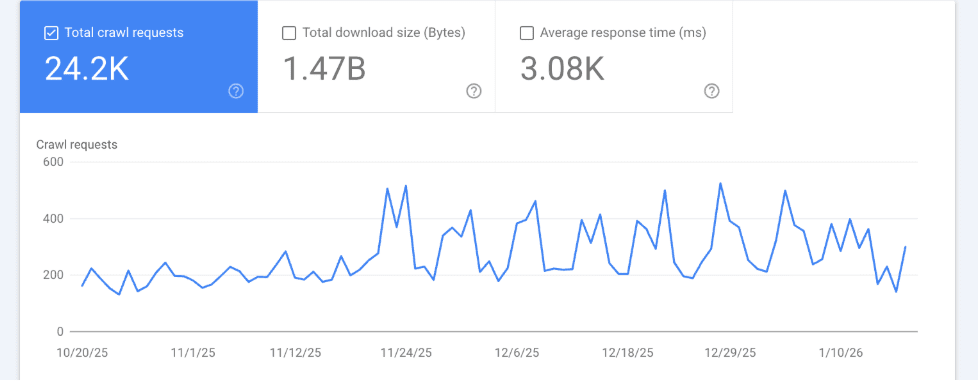
Crawl stats show how search engine bots interact with the site. This includes how often they crawl, which URLs and file types they focus on, and how your server responds to the crawler’s requests. The most important signals are trends over time, the share of non-200 responses (especially 5xx errors), and whether crawl activity is concentrated on indexable, high-value pages. Healthy crawl stats align bot activity with pages you want indexed, show stable response times, and avoid excessive crawling of redirects, errors, or parameterized URLs. Most metrics found here are connected with the Pages report.
Step 3 – Do Google Pagespeed Insights Tests on Vital URLs / URL Per Taxonomy
The third go-to tool for tech SEO audits. It covers both lab and field data, and gives you PSI metric benchmarks and how the site being audited scores against them in both field and lab testing situations. Now, the downside (if you can call it that) is that you can do Google PSI tests on one URL at a time. However, there are workarounds for this that I will add to the bonus list at the end of this guide.
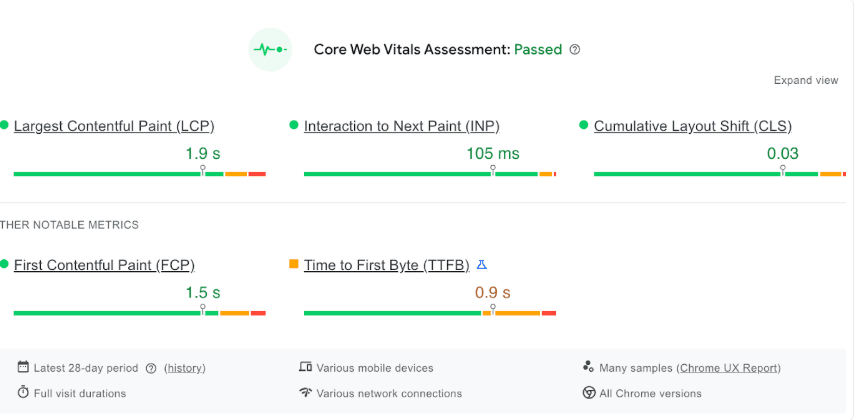
This report is similar to the GSC report for Core Web Vitals. It shows nearly identical numbers when it comes to real life data from real users who accessed the audited site in the past period. Again, these are simply there, you cannot affect them beyond affecting lab results, since field data take other aspecs into consideration like user devices and internet tech.
Lab Data Report
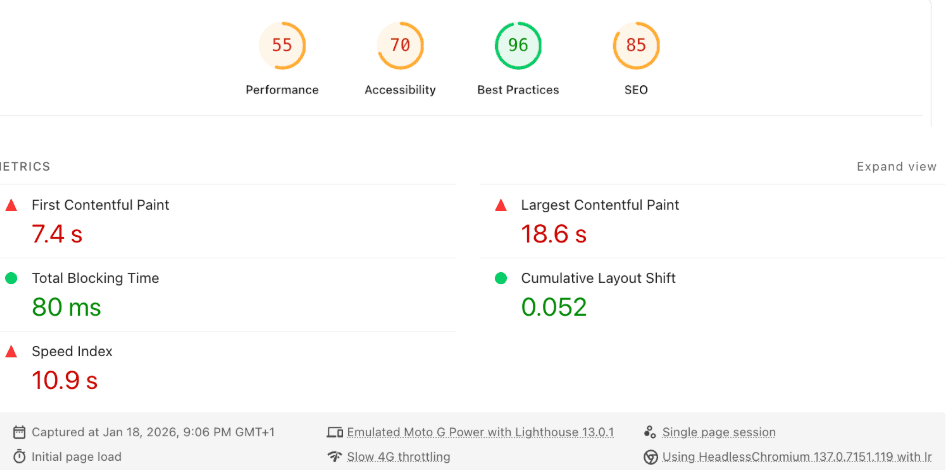
This is the core of the use of Google Pagespeed Insights, as it shows actual performance of the site in ideal case scenarios. The top panel shows the current metrics, as well as the Core Web Vital metrics themselves (FCP, LCP, TBT, CLS, Speed Index). Won’t bore you with what each of these represent. All you need to remember is that each of these is representative of each stage of the load time of the page:
- Initial load (FCP, Speed Index)
- Loading process (TBT, CLS)
- Final load (Speed Index, LCP)
- Layout shifts during load (CLS)
Also, keep in mind that there are separate CVW metrics for desktop and mobile. Mobile is always the priority.
Below the metrics, there are suggestions on implementations that can help improve the PSI metrics of the site itself in the form of Insights and Diagnostics.
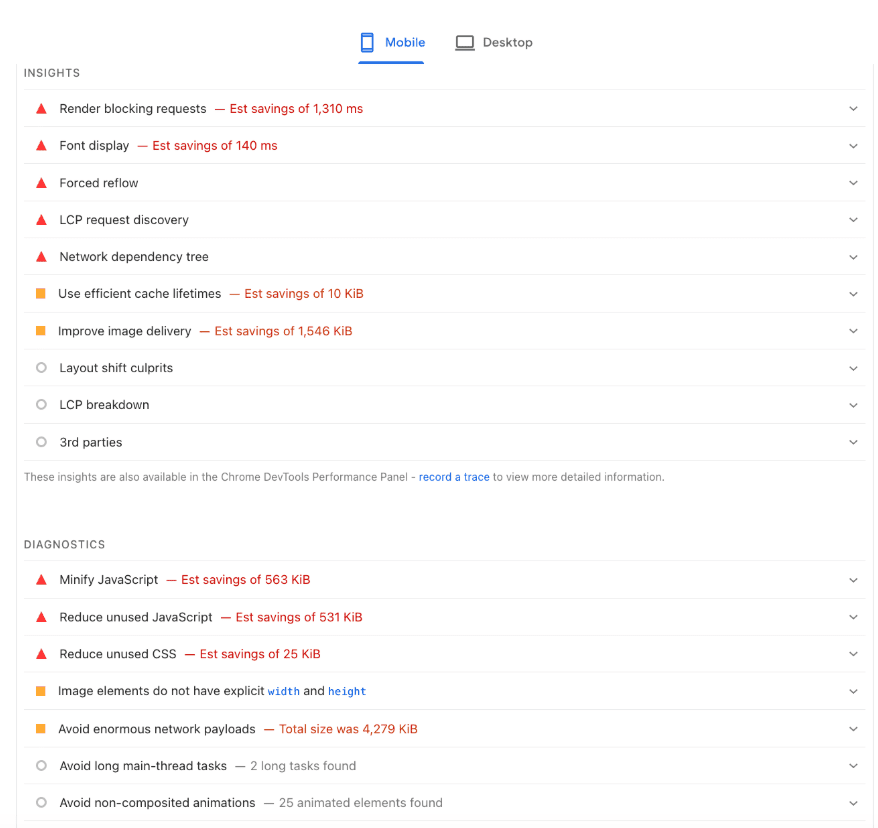
It’s important to know that the impact solving each of these is different. Based on what the audit triggers, there is a priority of what to fix based on the impact it has on the CVW metrics, as follows:
- Image optimizations – Images always need to be optimized first first, as they have the biggest impact on all CVW metrics. The great part about them is that they are perhaps the easiest optimization to do.
- Font optimizations – Fonts are usually the second biggest files on the site. Optimizing them is fairly easy as well, depending on which font face you are using. Google fonts can be hosted locally, you can leverage websafe fallback, or if flexible, you can use a websafe font from the get go.
- Script optimizations – These optimizations come third in the priorities. They revolve around optimizing the delivery of JavaScript, CSS, and HTML (among other code) by combining, minifying, and changing the load logic of these scripts (defer, async). Extreme cases require removing unused code, but the impact might not justify doing this as it’s very arduous to do.
- Browser Caching – This affects repeat visits, but substantially. Needless to say, all static resources shold have cache headers with proper expiry timings to avoid server resources hogs on the website’s side and slower loading speeds on the user’s side.
- Compression – Similar to browser caching, compression is a must-have as it saves resources. The go-to method nowadays is brotli, but gzip works just fine.
- Everything else – Other optimizations, like HTTP2/3 and DOM sizes, are secondary as they have minimal impact. Not to say you should ignore them, but do them after the other things are done.
Checklist – Your Complete Tech SEO Audit in One View
SETUP
☐ Install Screaming Frog
☐ Access Google Search Console
☐ Bookmark PageSpeed Insights
SCREAMING FROG
☐ Set user agent: Googlebot-Smartphone
☐ Crawl speed: 2 threads
☐ Enable hreflang + XML sitemaps
☐ Start crawl
ANALYZE CRAWL DATA
☐ Response codes (301s, 404s, 5xxs)
☐ Canonical errors
☐ Hreflang issues
☐ Meta tag problems
☐ Heading structure
☐ Image optimization
GOOGLE SEARCH CONSOLE
☐ Pages report (trends only)
☐ Sitemap status
☐ Core Web Vitals
☐ Security/Manual Actions
☐ Crawl stats
PAGESPEED INSIGHTS
☐ Test key page templates
☐ Review lab data metrics
☐ Prioritize image fixes
☐ Optimize fonts & scripts
☐ Enable caching & compression
VALIDATE & MONITOR
☐ Fix issues in priority order
☐ Use GSC “Validate Fix”
☐ Re-crawl with Screaming Frog
☐ Re-test with PageSpeed
☐ Document improvements
Pro Tips
While the above will help you create a comprehensive audit in most cases, here are some pro tips to help you even more.
- Leverage Screaming Frog API integrations – SF can integrate with a lot of 3rd party stuff, including GSC, GA4, Ahrefs, even Google’s Pagespeed API (which will help you measure PSI metrics and issues on all crawled URLs), therefore it’s vital to explore these further. GSC and GA4 are fairly simple to link. Ahrefs requires a subscription. Google’s PSI API requires some Google Cloud Console Fiddling and is a little bit advanced, but it’s worth the set-up
- You can automate SF Crawls – There is a way to automate Screaming Frog crawls to take place on given days of the week, and the data will be extracted in a Google Doc. Very useful if you want to track issues and fixes on fixed intervals.
- You can do Google Pagespeed Tests via Google Chrome – The Lighthouse tests are very good, especially if you want to test a middle ground between field and lab data. It will use your current PC’s specs and internet connection, and you can throttle your system as well.
Final Words
A solid technical SEO audit doesn’t need to be overcomplicated to be effective. By combining a structured crawl, real Google data, and targeted performance testing, you can identify the majority of issues that actually hold a site back. And you can do it without wasting days in spreadsheets. The key is prioritization. Focus on what impacts indexability, crawlability, and real user experience first, then iterate. Remember, technical SEO is rarely “done”. With a repeatable audit process like this, you always know where you stand and what to fix next.